
Senior Content Strategist with over 10 years of experience in digital media and technical writing.
How To Make A Poll On YouTube? (2026 Step-by-Step Guide)
On Mobile & Desktop
Engaging with your audience is the secret to growing a successful channel. One of the fastest ways to do this is by asking your viewers questions.
Key Takeaways (Quick Steps Summary):
- Go to your YouTube Community Tab.
- Click the Poll icon (Text or Image).
- Type your question and add choices.
- Click Post.
How To Make A Poll On YouTube?
Many creators wonder how to create a poll on youtube to talk to their fans. It is very easy and takes just a few clicks. You can do it from your computer or phone.
What Is A YouTube Poll And How Does It Work?
A YouTube poll is a simple post where you ask a question. You give your viewers different choices to pick from. When a viewer clicks a choice, their vote is counted right away.
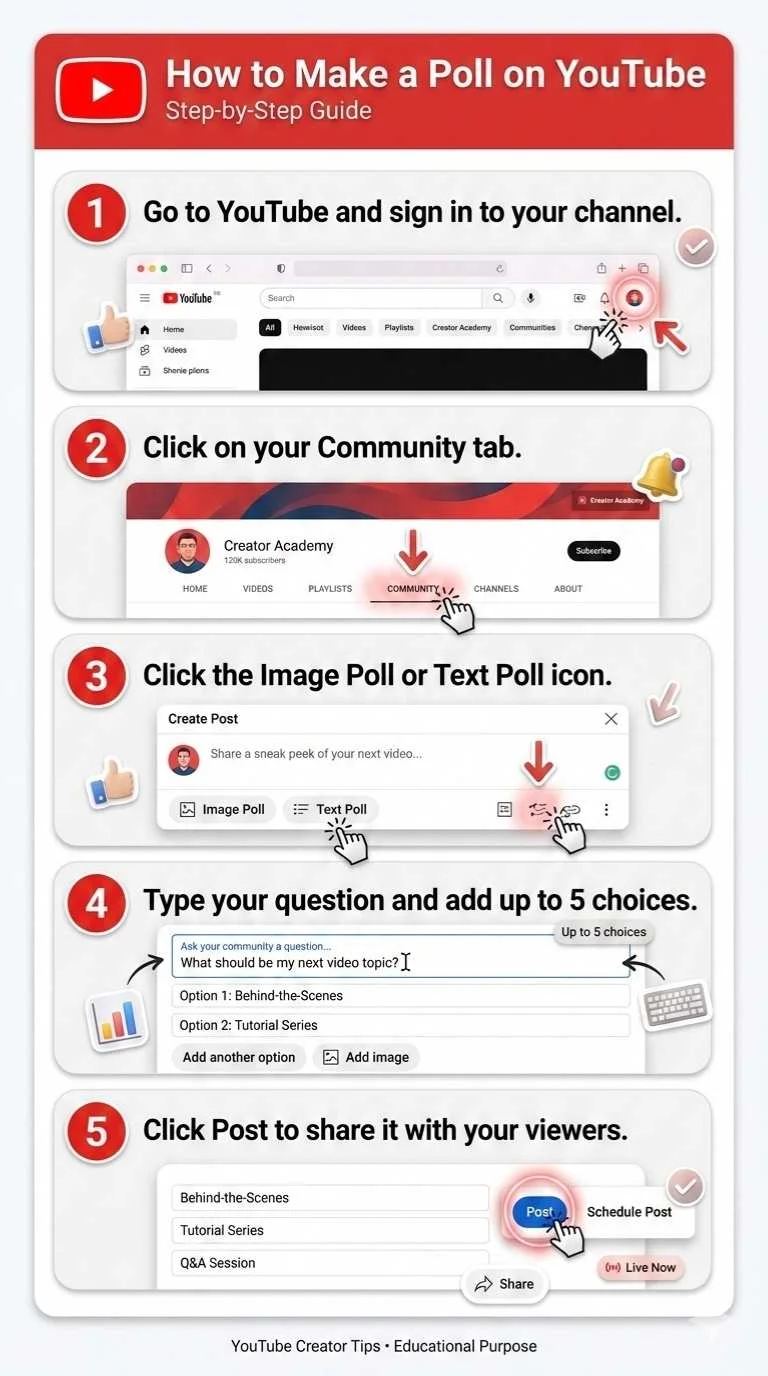
Step-by-Step Guide to Creating a Poll on YouTube (Desktop Method)
If you want to know how to do a poll on youtube using a computer, follow these simple steps. It takes less than a minute.
- Go to YouTube and sign in to your channel.
- Click on your Community tab.
- Click the Image Poll or Text Poll icon.
- Type your question and add up to 5 choices.
- Click Post to share it with your viewers.
What Types Of Polls Can You Create On YouTube?
You can create three types of Community polls: Text polls, Image polls, and GIF polls (currently rolling out). Text polls allow up to five text-based options, while Image and GIF polls allow up to four visual options with short captions.
During a Live Stream, you are limited strictly to text-based polls with up to four options.
How To Make A Poll On YouTube On Phone?
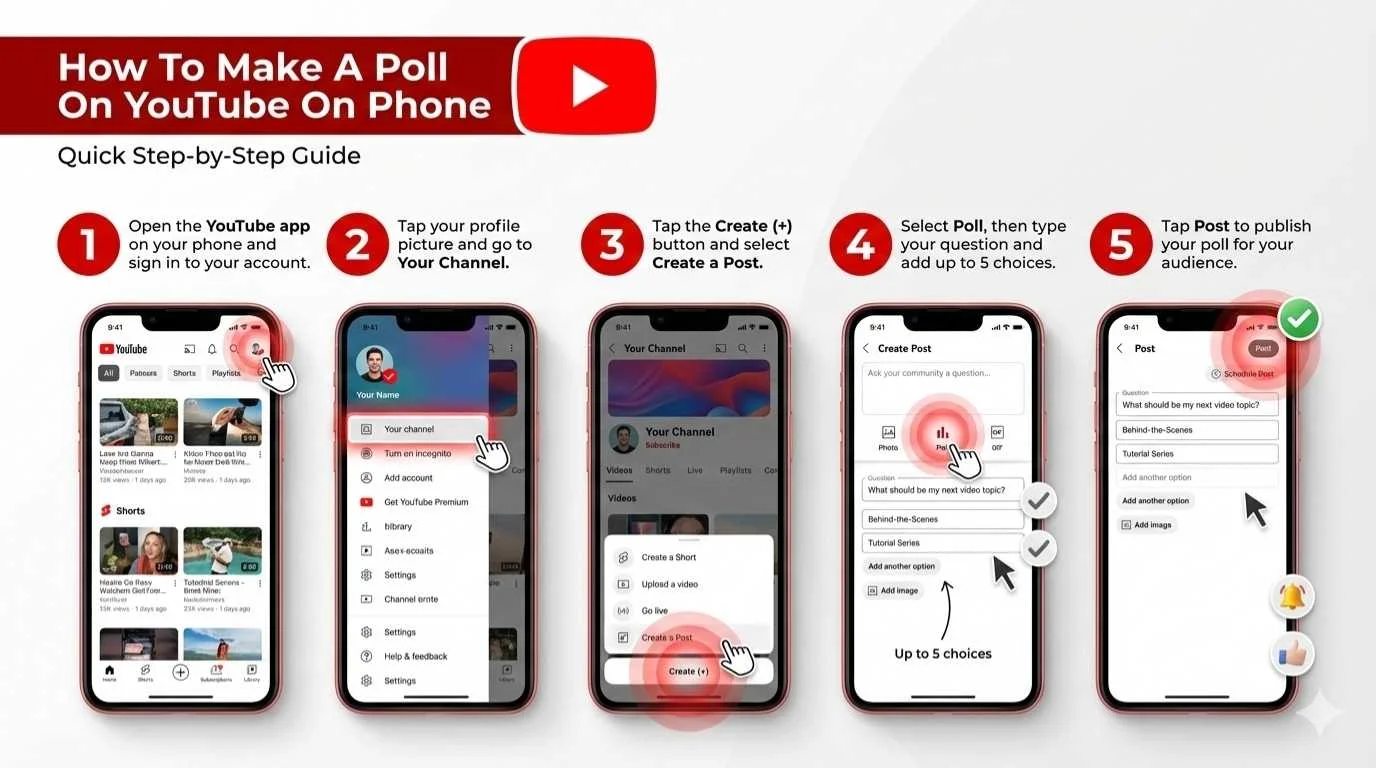
Most people use the mobile app to manage their channels. Here is how to post a poll on youtube using your phone.
- Open the YouTube app.
- Tap the + (Plus) button at the bottom center.
- Select Create a post.
- Tap the Poll icon (choose text or image).
- Type your choices and tap Post.
How To Make A Poll On YouTube On Phone? (Step by Step Visual Guide) ⬇️
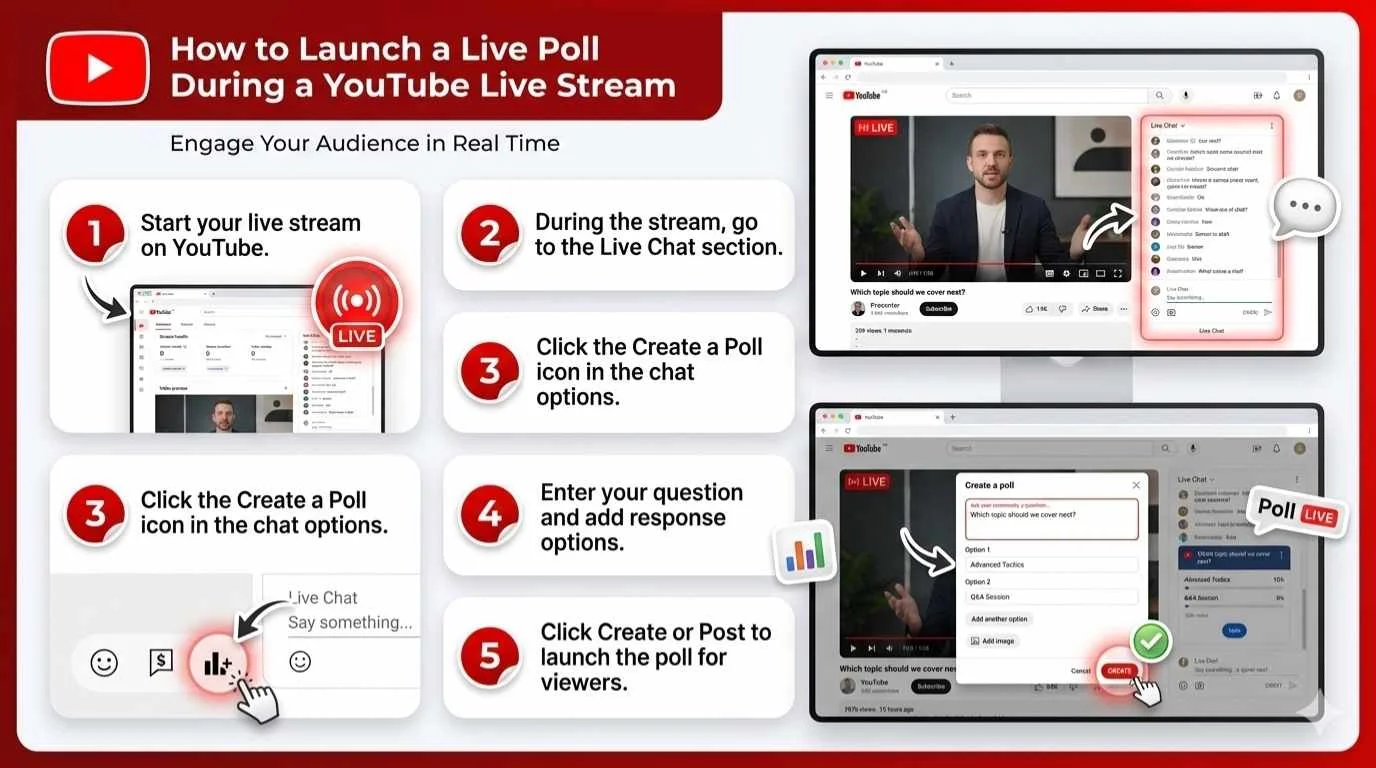
How to Launch a Live Poll During a YouTube Live Stream?
You can also ask questions while you are live on video. This makes your live chat very exciting for fans.
- Start your YouTube Live stream.
- Look at the bottom of the live chat window.
- Click the Create a Poll icon (it looks like a graph).
- Type your question and click Ask your community.
How to Launch a Live Poll During a YouTube Live Stream? (Step by Step Visual Guide) ⬇️
YouTube Poll Requirements: Eligibility, Features & Access Rules
You must meet a few simple rules to use this feature. Almost all channels can use polls today.
- You need access to the Community Tab.
- You must have Advanced Features enabled in YouTube Studio.
- Your channel must not be set as “Made for Kids”.
Why Creating a Poll on YouTube Boosts Engagement and Audience Interaction?
Polls are fun and very fast for viewers to answer. This tells YouTube that people like your channel. High engagement helps push your content toward the level of the most viewed YouTube videos.
Best Practices for Writing High-Converting YouTube Poll Questions?
To get more votes, keep your words very simple. Good youtube poll questions should be fun and easy to answer. High engagement helps you understand your YouTube RPM by keeping your audience active.
- Keep choices short (under 5 words).
- Ask what video they want to see next.
- Use emojis to make it look nice.
How to Promote Your YouTube Poll to Get More Votes and Visibility?
You want as many people to vote as possible. More votes mean more people see your channel. This steady growth can improve your earnings for 100k views over time.
- Talk about your poll in your regular videos.
- Pin a link to the poll in your video comments.
- Share the poll on your other social media apps.
How to View and Analyse YouTube Poll Results in YouTube Studio?
Once you know how do you make a poll on youtube, you need to check the votes. You can see how many people voted and what they chose. If you want to estimate your channel income based on this traffic, use a youtube ad revenue calculator.
- Go to YouTube Studio.
- Click on Content and then Posts.
- Find your poll to see the vote percentages.
Are YouTube Polls Anonymous? Understanding Privacy and Viewer Data
Yes, YouTube polls are completely anonymous. You cannot see the names of the people who voted. You only see the total number of votes and the percentage for each choice.
How to Edit, Disable, or Turn Off a YouTube Poll?
Sometimes we make mistakes when typing. Here are common problems and simple solutions for fixing your polls.
- Problem: You made a spelling mistake.
- Solution: You cannot edit a poll after posting. You must delete it and make a new one.
- Problem: You want to stop people from voting.
- Solution: Click the three dots on the post and select Delete.
Conclusion: Start Using YouTube Polls to Increase Channel Growth
Polls are a fast and easy way to talk to your fans. They boost engagement and help you learn exactly what your audience wants to see next.
FAQs
How Many Subscribers Do You Need To Make A Poll On YouTube?
Zero. It’s a common misconception that you still need 500 or 1,000 subscribers.
YouTube updated its rules. Today, anyone can access the Community tab and create polls by simply unlocking Advanced Features in their YouTube Studio settings.
Can Viewers See Poll Results Before Voting?
No. Viewers must cast their vote first.
Once they click their choice, the poll instantly updates to show the percentage breakdown of all votes cast. This prevents “bandwagon voting” and keeps your data accurate.
Where Do YouTube Community Polls Appear?
Your polls show up in three main places:
- Your channel’s Community tab.
- The Home feed of your subscribers (and sometimes non-subscribers).
- The Subscriptions feed.
Can You Schedule A Poll Post On YouTube?
Yes, absolutely.
When creating a poll on a desktop or mobile device, click the clock icon (or the drop-down arrow next to “Post”). You can then pick the exact date and time you want your poll to go live.
How Long Does A YouTube Poll Stay Active?
Community tab polls stay active indefinitely until you manually delete them. People can vote on a poll years after you post it.
However, you now have the option to set an expiration timer (like 24 hours) if you want the post to disappear automatically. Live Stream polls disappear as soon as you end the poll in the chat.
Can You Create A Poll Directly Inside A YouTube Video?
No, not anymore.
YouTube used to have an interactive “Poll Card” feature that popped up during video playback, but they removed it to streamline the viewer experience. You must use the Community tab, Shorts stickers, or Live chat instead.
Can You Do A Poll In YouTube Comments?
There is no built-in polling feature for the comment section.
Workaround: You can pin your own comment asking viewers to “Reply with A, B, or C.” Alternatively, pin a comment containing a link that points directly to a poll on your Community tab.
Where Is Poll In YouTube?
You can find the polling feature in three places:
- Community Tab: Click the “+” create button and select “Create a post.”
- Shorts Camera: Under the “Stickers” menu after recording a Short.
- Live Chat: At the bottom of the chat window during an active stream.
How To Make A Poll On YouTube Shorts?
YouTube recently added a dedicated poll sticker for Shorts.
- Open the YouTube app and record your Short.
- Tap the Stickers icon on the right menu.
- Select the Poll sticker, type your question/answers, and drag it onto the screen.
How To Make A Poll On YouTube Without 500 Subscribers?
If you have zero subscribers, you just need to verify your channel to unlock the Community tab.
- Go to YouTube Studio > Settings > Channel > Feature Eligibility.
- Next to Advanced Features, click “Access Features.”
- Verify your identity using a valid ID, a quick video verification, or by building channel history over two months.
How To Make A Poll On YouTube On iPhone
- Open the iOS YouTube app and tap the “+” icon at the bottom center.
- Tap Create a post.
- Select the Poll icon (it looks like a mini bar graph), enter your details, and tap Post.
How To Make A Poll On YouTube On Android
- Open the Android YouTube app and tap the “+” icon at the bottom.
- Select Create a post.
- Tap the Poll icon, type out your question and options, and hit Post.
How To Make A Poll On YouTube Live Stream As A Moderator?
You don’t have to be the channel owner to run a live poll.
- If the creator has assigned you as a Standard or Managing Moderator, you have access to the poll tool.
- Simply click the Poll icon at the bottom of the live chat, fill out the prompt, and publish it to the chat on the creator’s behalf.
Share This Post
Latest articles